Product comparison tables help shoppers weigh options quickly. This guide explains product comparison table design ecommerce uk merchants can use to increase conversions without confusing customers. You will find practical rules, mobile and accessibility guidance, implementation tips and ready-to-use templates plus a launch checklist.
When to use a product comparison table
Situations where comparison tables work best
Comparison tables perform well when products are similar in purpose but differ on specific features or specs — for example, consumer electronics, SaaS tiers, or business-grade equipment. They suit buyers who make feature-led decisions and want a side-by-side overview before choosing.
In B2B contexts, where buyers compare warranties, integrations or compliance features, a table speeds decision-making; if you sell to businesses consider specialist design approaches and testing such as those used in our B2B web design consultation.
When to avoid tables
Avoid comparison tables for highly personalised, emotional or bespoke purchases. Where storytelling, lifestyle imagery or service experience drive decisions (luxury goods, custom services), a guided content approach or detailed product page is better.
Alternatives: filters, guided selling and product finders
Use filters when shoppers want to narrow large ranges quickly. For complex decisions try guided selling (question flows) or a product finder. These can complement a comparison table by reducing the number of products presented side-by-side.
Core elements of an effective comparison table
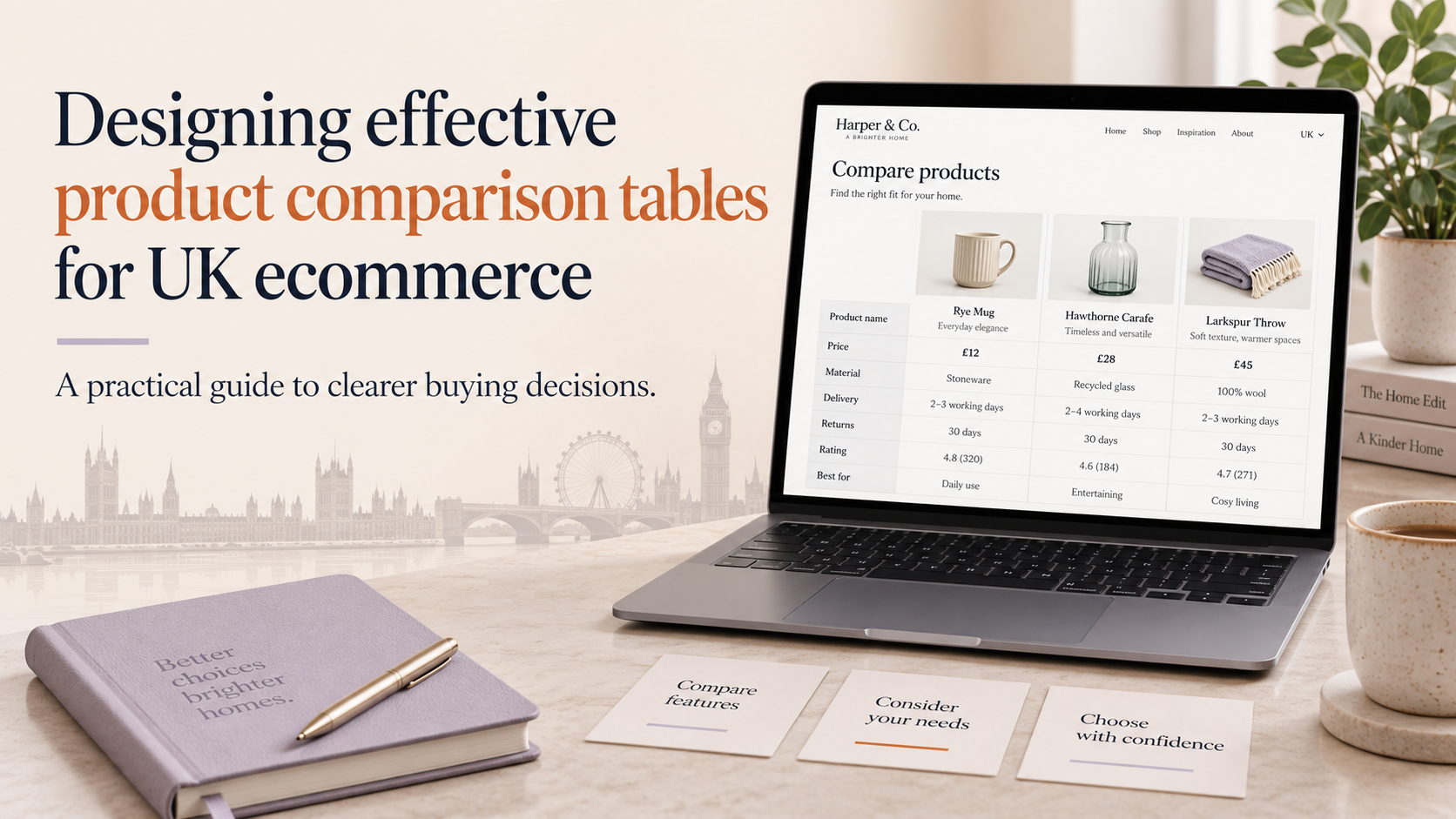
Clear product names and recognisable imagery
Show concise product names and consistent thumbnail images or logos. Images establish brand and product recognition; if you need stronger brand visuals consider our Custom logo design and branding services to make thumbnails clearer and trusted.
Concise, prioritised feature rows
Limit rows to the features customers actually care about. Prioritise decision-driving attributes at the top and group secondary details below. Keep text short and use tooltips or expandable rows for long explanations.
Price, availability and delivery/returns summaries
Include up-front price, stock status and a short delivery/returns line. Shoppers often use price and delivery as deal-breakers; showing this information avoids wasted time and abandoned journeys.
Consistent and visible CTAs for each product
Every column should include a single, consistent CTA (for example, “Add to basket” or “View details”). Keep CTA placement identical across columns so comparisons remain direct and fair.
Trust signals: reviews, warranty and seller badges
Display review scores, warranty periods and official seller badges alongside each product. Trust elements answer credibility questions quickly and reduce friction when moving to purchase.
product comparison table design ecommerce uk: Design and layout best practices
Keep it scannable
Group related rows, use subtle zebra strips and generous whitespace. Scannability reduces cognitive load and helps shoppers spot differences at a glance.
Visual hierarchy and emphasis
Use typography and contrast to guide the eye: stronger weight for product names and prices, muted text for secondary specs. Reserve a single highlight colour to emphasise the best or recommended option.
Avoid choice overload
Limit visible columns — typically 3 to 5 products for general shoppers. If you must show more, let users select which products to compare or use progressive disclosure to reveal additional columns.
Emphasise key differences
Use badges, icons or colour accents to call out unique benefits (for example, “Most popular”, “Best battery”). Ensure any visual emphasis is factual and clearly explained to avoid misleading customers.
Design for quick comparison
Align numbers on the same decimal place, use consistent units and keep icons simple. Avoid long sentences in rows; provide a short summary and link to the product page for full details.
Accessibility and UK legal considerations
WCAG basics for data tables
Use semantic table markup with row and column headers, captions and summaries. Ensure keyboard navigation, visible focus states and logical reading order. These practices support screen readers and meet common accessibility expectations.
Presenting prices and VAT clearly
Under UK consumer rules you should show the full price the customer pays, including VAT where applicable, unless your business model or messaging requires different presentation. Be explicit about delivery costs and any extra fees to avoid misleading comparisons; our article on Designing Shopify themes for UK retailers: VAT, shipping and trust considerations explains practical display choices for UK stores.
Readable markup for assistive tech
Provide text alternatives for icons, avoid conveying meaning by colour alone, and make expandable content keyboard operable. Test with screen readers and include hidden explanatory text where visual cues alone are used.
Avoiding misleading comparisons
Do not compare products on criteria that favour one item unfairly. If you use scores or rankings, show the calculation method or link to methodology to maintain trust and comply with fair trading expectations.
Responsive patterns: making comparison tables work on mobile
Stacked card alternative
On small screens, present each product as a stacked card showing the most important rows first (price, rating, quick specs). Allow users to expand cards to view full details or the entire table on demand.
Horizontal scroll with sticky headers
Keep the first column (product name/image) fixed and allow horizontal scrolling for the rest. Sticky headers and first-column freeze help users maintain context while swiping.
Progressive disclosure
Show highlights initially (price, rating, one or two top specs) and offer a “Compare details” button to reveal full rows. This keeps the initial view concise while preserving depth for engaged buyers.
Touch targets and performance
Ensure buttons are large enough for touch and avoid heavy scripts that slow rendering. If you need help making components responsive, our Responsive web design services cover usability and performance testing across devices.
Platform implementation tips (WordPress, Shopify and more)
WordPress/WooCommerce
Page builders and shortcodes can create tables quickly, but check performance and markup output. Use semantic HTML where possible and avoid inline scripts that block rendering. If you prefer professional help, our WordPress web design services can assist with implementation and optimisation.
Shopify
On Shopify use metafields for structured product attributes and consider theme-level templates for comparison pages. Decide whether an app or custom theme code fits your needs; our Shopify web design advice for ecommerce stores explains the trade-offs between apps and bespoke theme work.
Performance
Optimise images, lazy-load non-visible thumbnails and avoid loading large libraries for comparison pages. Keep DOM size reasonable and serve only the data required for the initial view.
Plugin/App vs custom module
Choose a plugin or app for speed of launch; choose custom code if you need tailored UX, tight performance or specific accessibility requirements. For full store builds or custom modules consider our E-commerce store design services to scope the work correctly.
Testing, analytics and measuring success
A/B test hypotheses
Test one variable at a time: layout (table vs cards), number of columns, CTA wording or highlighted differences. Keep tests long enough to collect meaningful data.
Key metrics
Track conversion rate, add-to-cart rate from the comparison page, time-to-decision and bounce. Monitor whether the table shortens or lengthens decision time and how it affects downstream steps.
Qualitative feedback
Use session recordings and short on-page surveys to capture confusion points and missing information. Recording where users hesitate helps identify rows that need clearer copy or different ordering. For broader abandonment causes, our article on Why customers abandon ecommerce websites — and how design can help provides additional context.
Iterate and avoid novelty effects
Expect initial improvements from a redesign; continue testing to ensure gains are sustained and not just due to novelty.
Templates, examples and launch checklist
Template A: simple 3-column comparison for fast decisions
Columns: Product image + name, Price & CTA, 4 top specs (battery/size/warranty/rating). Use bold price, single CTA per column and a short delivery line under the price.
Template B: feature-rich 5-column comparison for technical buyers
Columns: Image/name, Price & availability, Technical specs (3–5 rows), Integrations/compatibility, Warranty & support. Include expand/collapse for long spec rows and a clear method explanation for any scores.
Launch checklist
- Content: confirm feature rows match customer questions and use consistent units.
- Accessibility: semantic table markup, keyboard navigation and alt text completed.
- Mobile: verify stacked cards or horizontal scroll patterns on common devices.
- Performance: optimise images, lazy-load and check total page weight.
- Analytics: set goals, funnels and events for CTA clicks and expand actions.
- Legal: ensure prices and fees are clear and VAT is shown where required.
Common pitfalls to avoid after launch
- Overcrowding the table with too many products or specs.
- Using colour alone to convey meaning.
- Missing mobile testing and touch-target checks.
- Failing to measure impact or relying on intuition instead of data.
Frequently asked questions
When should I use a comparison table instead of product filters or a buying guide?
Use a comparison table when shoppers need a side-by-side view of similar items to make feature-led decisions. Use filters to narrow large catalogues and a buying guide for more consultative or emotional purchases.
How many products and features should I include in a comparison table?
Show 3–5 products for typical shoppers. Prioritise 6–10 feature rows that matter most; put additional details behind expand controls.
What are the best ways to make a comparison table usable on mobile?
Use stacked cards, horizontal scroll with sticky headers, or progressive disclosure. Ensure touch targets are large and that essential info (price, rating, CTA) appears without extra taps.
Do comparison tables affect SEO and how should I mark them up?
Semantic table markup can be indexed normally. Include unique descriptive copy and structured data where appropriate for product snippets, but avoid hidden content that might be treated as deceptive. Keep headings and caption text crawlable.
What accessibility requirements should I follow for comparison tables in the UK?
Follow WCAG practices for table headers, keyboard accessibility and clear focus states. Avoid relying on colour alone and test with assistive technology. For compliance-sensitive matters seek professional accessibility advice.
Summary and next steps
Start by deciding whether a comparison table suits your audience. If it does, define the limited set of products and decision-driving rows, design for scannability and mobile, ensure accessibility and measure impact with a controlled test. In the next 7 days map the features and required data; in 30 days prototype and test on mobile; in 90 days run an A/B test and iterate based on analytics.
If you need help implementing a fast, accessible and well-performing comparison table, request a free consultation with Logo Metic to discuss the right approach for your store.