Introduction
This article explains why effective homepage messaging matters for UK solicitors and how to balance persuasive copy with regulatory and privacy constraints. It focuses on the homepage only, not a full content strategy, and gives a practical, ready-to-adapt framework including copy blocks, trust modules, CTA variants and wireframe guidance that remain mindful of UK rules.
homepage messaging solicitors uk: why it matters
A solicitor’s homepage must build clarity, trust and a clear route to contact. Good messaging reduces friction so prospective clients understand whether you can help and how to reach you quickly.
What business goals a solicitor homepage must serve
- Clarity: State who you help, what you do and where you operate within a few seconds.
- Trust: Communicate regulated status, credentials and safe handling of client matters.
- Lead generation: Offer low-friction contact paths: phone, short form, booking or chat.
Common homepage conversion barriers for law firms
- Overly technical language that confuses non-specialist visitors.
- Vague or unsubstantiated claims that raise red flags for regulators or users.
- Long forms or buried contact methods that increase drop-off.
Regulatory and privacy constraints to check first
Before drafting copy or adding features, confirm the advertising and data rules that affect wording, testimonials and contact handling.
Overview: SRA and Law Society guidance on publicity and advertising
Solicitors must follow SRA (and relevant Law Society) guidance on publicity. That influences how you present expertise, outcomes and comparisons. Keep language factual, avoid misleading claims and include required regulatory statements.
Client testimonials, claims and outcomes — do’s and don’ts
Use caution with testimonials and outcome claims. If you include case results or client feedback, ensure they are accurate, up-to-date and do not guarantee results. Where testimonials are restricted, consider alternative trust signals such as membership badges or anonymised, factual summaries of service areas.
Data protection, contact forms and cookies — GDPR and ICO considerations
Contact forms must collect only necessary data, have a clear lawful basis for processing and link to a privacy notice. If you use cookies for analytics or marketing, ensure proper consent mechanisms are in place per ICO guidance.
Core elements of a high-converting solicitor homepage
Design each module with intent: what should the user do next and why should they trust you to help?
Hero: headline, supporting line, visual and primary CTA
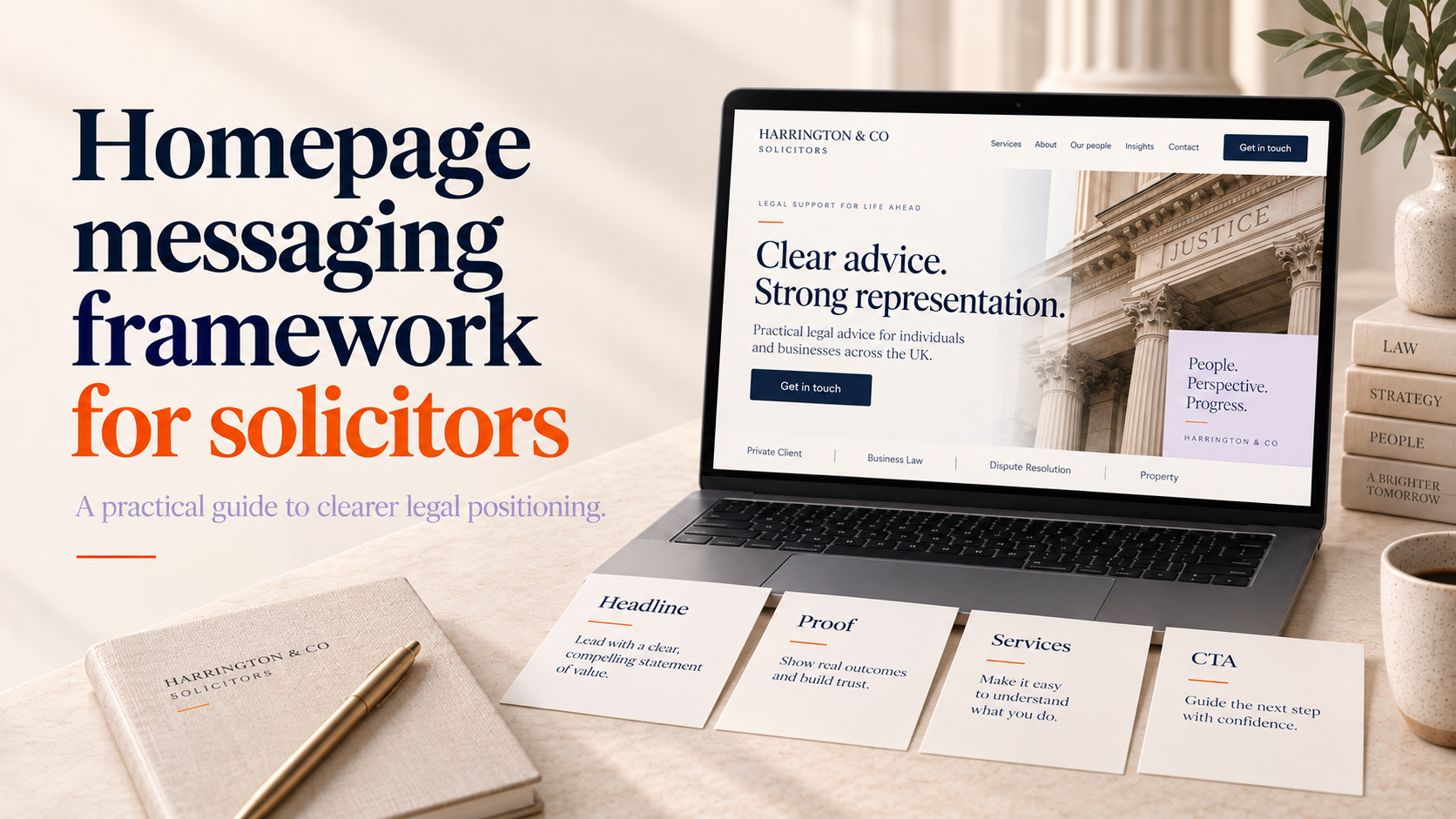
The hero must answer who you are, who you help and the next step in a single view. Use a concise headline, a short supporting line and a prominent CTA.
Trust modules: regulated status, accreditations, specialist badges
Display regulated status and key accreditations near the top. These reassure visitors and reduce enquiry friction.
Service overview: scannable practice area summaries with micro-CTAs
Offer short, scannable summaries for each practice area with a micro-CTA (Find out more / Book a callback). For firms serving businesses, consider linking into your B2B approach for clearer service modular layouts; this often helps structure service pages more effectively.
Lead capture and contact paths: short form, phone, live chat options
Provide multiple contact paths. A short micro-form above the fold for quick enquiries plus clear phone and booking options increases conversion for different user preferences.
Footer essentials: contact details, complaints procedure link, regulatory statements
The footer should include full contact details, a clear complaints procedure link and any required regulated wording so visitors can verify credentials easily.
Ready-to-adapt copy blocks and CTA variants
Below are practical snippets you can adapt. Keep them factual and avoid unprovable promises.
Hero copy templates
Reassurance-led
“Practical legal advice for individuals and families across [Region]. Quick advice, clear fees and regulated solicitors ready to help.”
Expertise-led
“Specialist employment law solicitors with experience in complex tribunal cases. Book an initial review with a senior solicitor.”
Locality-led
“Experienced solicitors in [City] — legal support for property, family and wills. Visit our offices or arrange a phone consultation.”
Service module snippets (short summaries)
- Family law: Advice on separation, child arrangements and mediation. Find out more
- Conveyancing: Fixed-fee property conveyancing with transparent costs. Get a quote
- Employment: Employer and employee advice, tribunal representation. Book a review
Trust module microcopy
Phrase regulated status simply: “Authorised and regulated by the Solicitors Regulation Authority (SRA).” For accreditations: “Member of [membership name]” or “Accredited specialist in [area].” Keep claims factual and verifiable.
CTA variants and microcopy for forms, phone and booking
- Primary CTA (book): “Request a consultation”
- Phone CTA: “Call now — speak to a solicitor”
- Short form submit: “Send enquiry — we’ll respond within 24 hours”
- Micro-copy: “We’ll only use your details to reply to this enquiry. Read our privacy notice.”
For examples of lead-capture wording and form placement you can adapt, see a related example on designing a lead-capture homepage for accountants.
Designing a lead-capture homepage for accountants (UK)
Wireframe recommendations: hero and service modules
Desktop hero wireframe
Left-aligned copy block with headline, supporting line, two CTAs (primary and secondary). Right-side image or contextual visual showing a consultation or office. Include a short trust line beneath the CTAs with SRA wording and a key accreditation badge.
Mobile-first hero adjustments
Stack content vertically: headline, supporting line, primary CTA, then trust badges. Make CTAs thumb-friendly and large enough for tap. For guidance on responsive behaviour, consider our responsive web design best practice.
Service module wireframe
Use a three-up grid on desktop for 3–6 key practice areas with short blurbs and a micro-CTA. On mobile, stack these as cards. Use a stacked list where clients search by problem rather than by service name.
For firms focused on business clients, our B2B web design approach can help structure service pages and modular layouts.
Lead-capture placement
Consider an above-the-fold micro-form (name, phone/email, brief issue) for quick leads and a separate detailed contact page for longer matters. Test the micro-form against a prominent phone CTA to see which converts better.
Trust modules and visual signals that reduce friction
Regulatory badges and required wording
Display the regulated status prominently. Use exact, factual wording and avoid embellishments.
Displaying accreditations, membership and awards
Place accreditation badges in a consistent grid and ensure logos are high quality and up-to-date. Professional branding supports credibility — if you need a refreshed mark, our custom logo design service can help present accreditations consistently.
Client logos and testimonials — compliant alternatives
If testimonials are restricted, use anonymised case types (e.g. “Successfully advised a local landlord on eviction matters”) or client categories (e.g. “Trusted by SMEs and landlords”) rather than named endorsements.
Accessibility, performance and SEO considerations
WCAG basics relevant to homepages
Ensure clear heading structure, sufficient contrast, keyboard focus on interactive elements and descriptive link text. These help all users and improve conversions.
Page speed and image optimisation for hero sections
Compress hero images, use modern formats and lazy-load where appropriate. Fast heroes lower bounce and improve enquiries. For sites offering online payments or fixed-fee services, review performance practice used in e-commerce projects.
E-commerce store design | Shopify web design
On-page SEO
Use the primary keyword naturally in the homepage headline or a subheading and in the meta description. Avoid keyword stuffing. Also ensure meta titles and descriptions are clear and match page content.
A/B test ideas, metrics and launch checklist
Priority A/B tests
- Headline variations (reassurance vs expertise vs locality).
- CTA text (Request a consultation vs Book a call vs Get a quote).
- Form length (micro-form vs longer enquiry form).
Key metrics to track
- Session-to-contact rate (contacts / unique sessions).
- Bounce rate on the hero section (exit before interaction).
- Form completion rate and time to submit.
Pre-launch compliance and QA checklist
- Confirm regulated wording and complaints link are present.
- Verify privacy notice is linked from forms and cookie banner is functional.
- Proofread copy for factual accuracy and avoid unverifiable claims (see our landing page checklist for solicitors for further compliance-focused items).
Landing page design for solicitors (UK): compliant messaging and conversion checklist
Implementation and next steps
Handover checklist for copywriters and developers
- Final copy with regulated wording highlighted.
- List of badges/logos with source files and verification links.
- Design assets sized for responsive breakpoints and performance targets.
Working with Logo Metic: what we need to start
To implement these homepage wireframes and templates, we ask for a brief, brand assets and any compliance notes. If you’d like us to build the site, request a WordPress web design consultation and we’ll advise on timeline and costs.
Suggested rollout timeline and follow-up testing cadence
Typical timeline: 2–4 weeks for a homepage redesign and compliance review, then 4–6 weeks of A/B testing for initial optimisation. Schedule follow-up reviews every 3 months to refine messaging and measure enquiry quality.
FAQ
Can solicitors use client testimonials on their homepage?
Sometimes. Testimonials must be accurate and not misleading. If in doubt, use anonymised case descriptions or factual summaries of services instead and keep a record to show how the testimonial was obtained.
What phrases or claims should a UK solicitor avoid in homepage copy?
Avoid absolute guarantees of outcomes, unverifiable superiority claims (e.g. “best” without evidence) and comparisons that could mislead. Stick to factual statements about services and experience.
How should I display my firm’s regulated status on the homepage?
Use clear wording such as “Authorised and regulated by the Solicitors Regulation Authority (SRA)” and place it where visitors look for credentials — near the hero or in the footer.
Is it better to use a short contact form on the homepage or a separate contact page?
Both have value. A short micro-form above the fold captures quick leads; a dedicated contact page can host a longer form and map. A/B test to see which performs best for your firm.
How can we test whether our new homepage is increasing enquiries?
Track session-to-contact rate, form completion and phone call conversions. Run A/B tests on headline and CTA variations and monitor changes in enquiry volume and quality over several weeks.
Request a free consultation with Logo Metic — if you want help implementing this framework or building a compliant, high-converting homepage, request a WordPress web design consultation and we’ll review your brief and next steps.