If you are wondering what is included in a brand identity package, this article will help. It explains the difference between a single logo and a full identity, lists the common deliverables and file types, and offers a downloadable-style checklist you can use when briefing designers or comparing quotes.
What is a brand identity package?
Definition and the difference between a logo and a brand identity
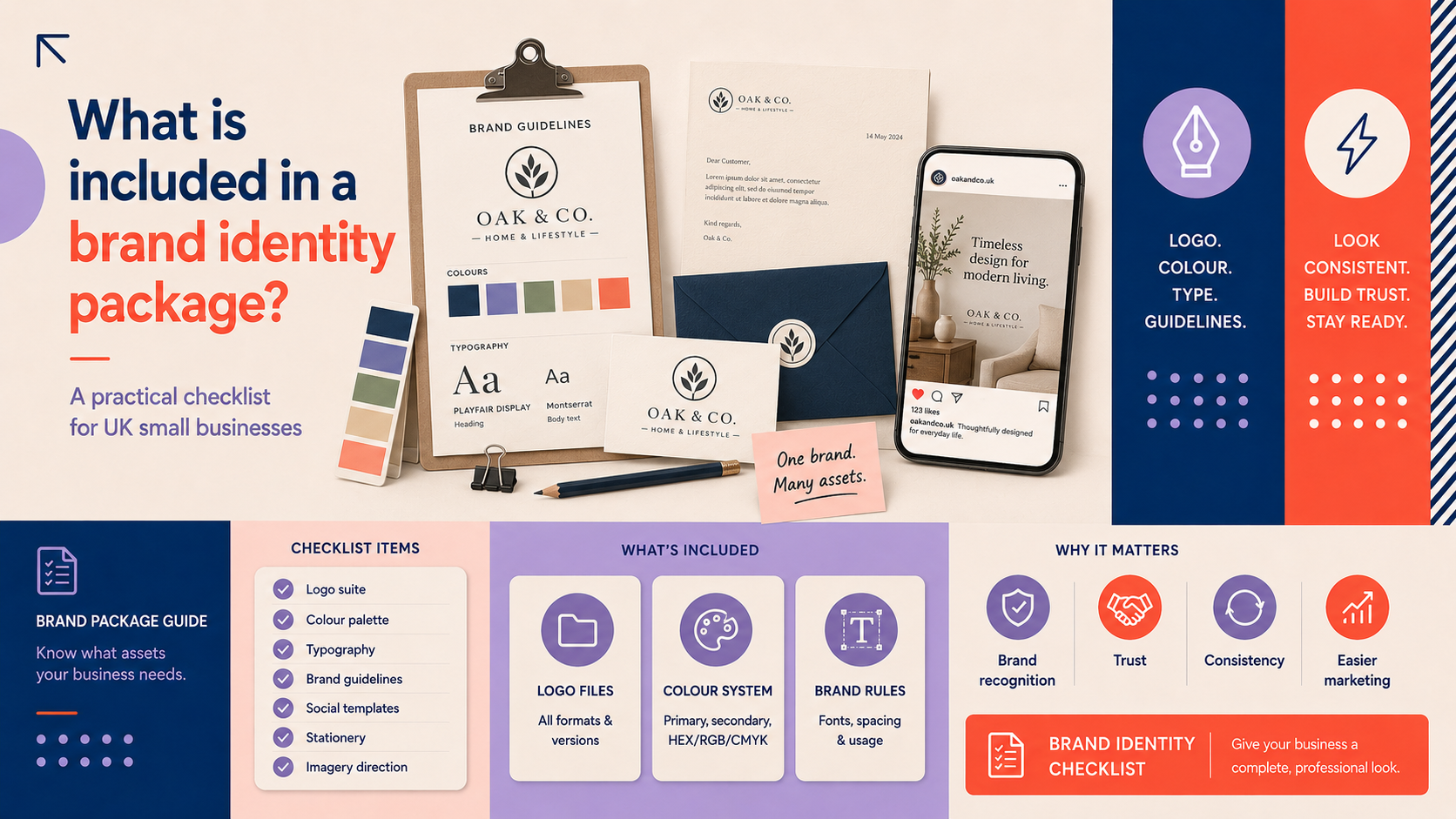
A brand identity package is a collection of visual and practical assets that define how your business looks and communicates. A logo is a single mark; a brand identity covers that mark plus the colours, type, imagery, rules and templates needed to use it consistently across print, web and social channels.
Why small businesses need a package (consistency, recognition, future-proofing)
For small businesses, consistent branding builds recognition and trust. A proper package prevents ad-hoc design choices that dilute your message and makes future work — from websites to packaging — faster and cheaper because suppliers have clear specifications to follow.
Core visual deliverables every package should include
When comparing proposals, the following core deliverables are the minimum you should expect. These items ensure flexibility across contexts and keep your brand consistent.
Primary logo and approved variations (horizontal, stacked, icon-only)
Your package should include the main logo and approved variations: horizontal and stacked versions, plus an icon-only or mark-only version for favicons and social avatars. If you need a favicon or animated intro, these are often offered as add-ons.
Logo work is typically handled through a custom logo design services engagement, which will produce the core logo options and variations.
Colour palette with hex/RGB/CMYK values
A clear palette with exact colour values for web (hex, RGB) and print (CMYK or Pantone where required) is essential. This lets printers and developers reproduce your colours accurately.
Primary and secondary typefaces or font recommendations
Include recommended fonts for headings, body text and any web-safe or webfont alternatives. If your chosen fonts require licensing for web or print, the designer should advise on how to obtain them.
Logo lockups and clearspace rules
Lockups show how the logo sits with a tagline or alongside other marks. Clearspace rules and minimum sizes prevent misuse and keep your mark legible in all applications.
Technical files and formats: what you must receive
Practical file formats are often overlooked but are crucial. Ask for these formats and understand why you need them.
Vector files: SVG, EPS and PDF – when and why they’re needed
Vector files scale without loss of quality. An SVG is ideal for the web and modern digital use. EPS and PDF are standard for printers and specialist suppliers. Always ask for vector versions so you can resize or refresh assets in future without recreating the logo.
Raster files: PNG (transparent), JPG and TIFF – typical uses
PNG with a transparent background is useful for placing logos over colours or images. JPGs are suitable for photography or where transparency isn’t required. TIFFs may be requested for high-resolution print jobs.
Animated and video-ready formats (when included)
If your package includes motion or an animated logo, request video-ready files such as MP4 or GIF and an alpha-channel MOV where applicable. For more on how animation helps social and video branding, see our article on animated logo benefits for social and video.
Source files and ownership notes (what to ask about)
Source files (for example, Adobe Illustrator .AI or layered PSDs) allow future edits. Confirm ownership and licensing in writing: you should receive the rights to use the assets for your business once final payment and transfer terms are agreed. Check any font or image licences separately.
Brand guidelines: the do-this (and don’t) manual
Basic vs expanded brand guidelines — what each contains
Basic guidelines cover logo usage, colours, fonts and a few examples. Expanded guides include tone of voice, photography style, layouts, icon styles, motion guidance and more. Small businesses often start with a basic guide and add to it as they grow.
Usage examples: logo placement, incorrect uses and tone of voice notes
Good guides show correct and incorrect logo use, spacing, acceptable backgrounds and simple copy examples. Even a few tone-of-voice notes help maintain consistency across marketing materials.
Templates and downloadable assets for staff and suppliers
Practical templates — for business cards, letterheads and social posts — save time. Include downloadable, editable files that staff and suppliers can use directly.
If you are considering a full set of guidelines, our brand identity design service can explain what a comprehensive package typically contains.
Practical brand assets and templates
These add-ons make your brand immediately usable and reduce additional cost later.
Stationery: business cards, letterheads and email signatures
Prepared print-ready files for business cards and letterheads, plus an email signature template, are common inclusions. Ask for print specs (bleed, trim, safe area) and a digital version of the signature for staff use.
Social media templates and profile images
Editable social templates (for example, Canva or PSD files) and correctly sized profile/header images help keep feeds consistent. For industry-specific inspiration, see our piece on spa branding ideas for UK salons and beauty businesses.
Presentation templates and basic iconography
PowerPoint or Google Slides templates and a small set of brand icons speed up pitches and client-facing materials.
Photography and imagery guidance or sample image treatments
Guidance on photography style and simple image treatments (colour overlays, filters, cropping) helps maintain a cohesive visual language when sourcing stock or commissioning shoots.
Digital-ready assets and web considerations
Digital requirements are central when launching a site or online store. Confirm these deliverables before the developer starts work.
Favicon and app icons, social sharing images (Open Graph/Twitter cards)
Provide small icon versions for favicons and app icons, and correctly sized Open Graph and Twitter card images for sharing pages on social platforms.
Web-safe colours, webfont recommendations and accessibility checks
Ask for web-safe alternatives, recommended webfonts (and licensing notes) and basic accessibility checks such as colour-contrast ratios for key text and interface elements. These steps help ensure your website meets common accessibility standards.
How brand assets map to a WordPress site or ecommerce platform
Make sure your designer and developer coordinate. Brand assets need naming conventions, responsive logo sizes and a handover folder for your CMS. If you plan a new website, our WordPress web design or ecommerce store design services can integrate the assets into a live site efficiently.
How to choose the right package for your business
Starter, growth and comprehensive packages: what to prioritise
Starter packages suit new businesses that need a logo, colour palette and basic files. Growth packages add social templates, stationery and a short guide. Comprehensive packages include a full guidelines document, templates and extended asset sets. Prioritise the items you will use most immediately.
Questions to ask your designer or agency
- Which file formats will I receive?
- Do you provide source files and transfer ownership?
- What level of brand guidance is included?
- Will you provide templates for our most-used channels?
- How do you handle font and image licences?
For more on scope and examples, see our brand identity design page which outlines what growing businesses can expect and how projects are scoped.
Common pitfalls to avoid (missing files, unclear ownership, lack of guidance)
Avoid packages that omit vector files, fail to document ownership or provide no guidance on usage. These omissions can cause delays and extra costs later.
Checklist: What to expect in your brand identity package (downloadable)
Essential checklist items (must-haves)
- Primary logo + horizontal/stacked/icon versions (vector and PNG)
- Colour palette (hex, RGB, CMYK)
- Font recommendations and webfont notes
- Brand guide (basic) with clearspace and minimum size
- Print-ready stationery files and social profile images
- Ownership and licence confirmation in writing
Nice-to-have add-ons (when they make sense)
- Animated logo files and short video formats
- Expanded brand guidelines with imagery and tone of voice
- Editable social and presentation templates
- Icon set and photography treatment guidelines
A short sample brief you can copy and adapt
“We are a small UK-based [industry] business seeking a brand identity package. Deliverables required: primary logo (vector), logo variations, colour palette with values, font recommendations, basic brand guide, business card and email signature templates, social templates (editable) and ownership transfer on final delivery.”
Frequently asked questions
What exactly is included in a basic brand identity package?
A basic package normally includes a primary logo with variations, vector and PNG files, a colour palette, font recommendations and a short brand guide that covers correct logo use and basic templates.
Which file formats should I insist on receiving?
Insist on vector files (SVG, EPS, PDF), transparent PNGs and at least one high-quality JPG. If you expect print work, request CMYK-ready files. Also confirm whether source files (AI or layered PSD) are included.
Do I need a full brand guidelines document for a small business?
Not always. Many small businesses start with a basic guide and add sections as needed. Expanded guidelines make sense if multiple people or external suppliers will use your brand regularly.
Can I use brand assets provided by an agency on my website and social channels?
Yes, provided the agency transfers the appropriate rights and you follow any font or stock image licence terms. Confirm these details before signing the contract.
How long does it usually take to deliver a complete brand identity package?
Timelines vary with scope. A basic identity can take a few weeks; a comprehensive package with many assets and revisions may take several months. Agree a schedule before work begins.
Next steps and applying your brand
To brief Logo Metic, start with your goals, audience and the primary applications you need the brand for (website, packaging, social). Our brand identity design service explains typical deliverables and the discovery process.
When you’re ready to apply your assets to a site, our WordPress web design and ecommerce store design services can integrate the brand into a modern, accessible website.
If you would like help defining what should be included in your brand identity package, request a free consultation with Logo Metic. Email support@logometic.co.uk or call +44 7883 180004 to discuss your project.