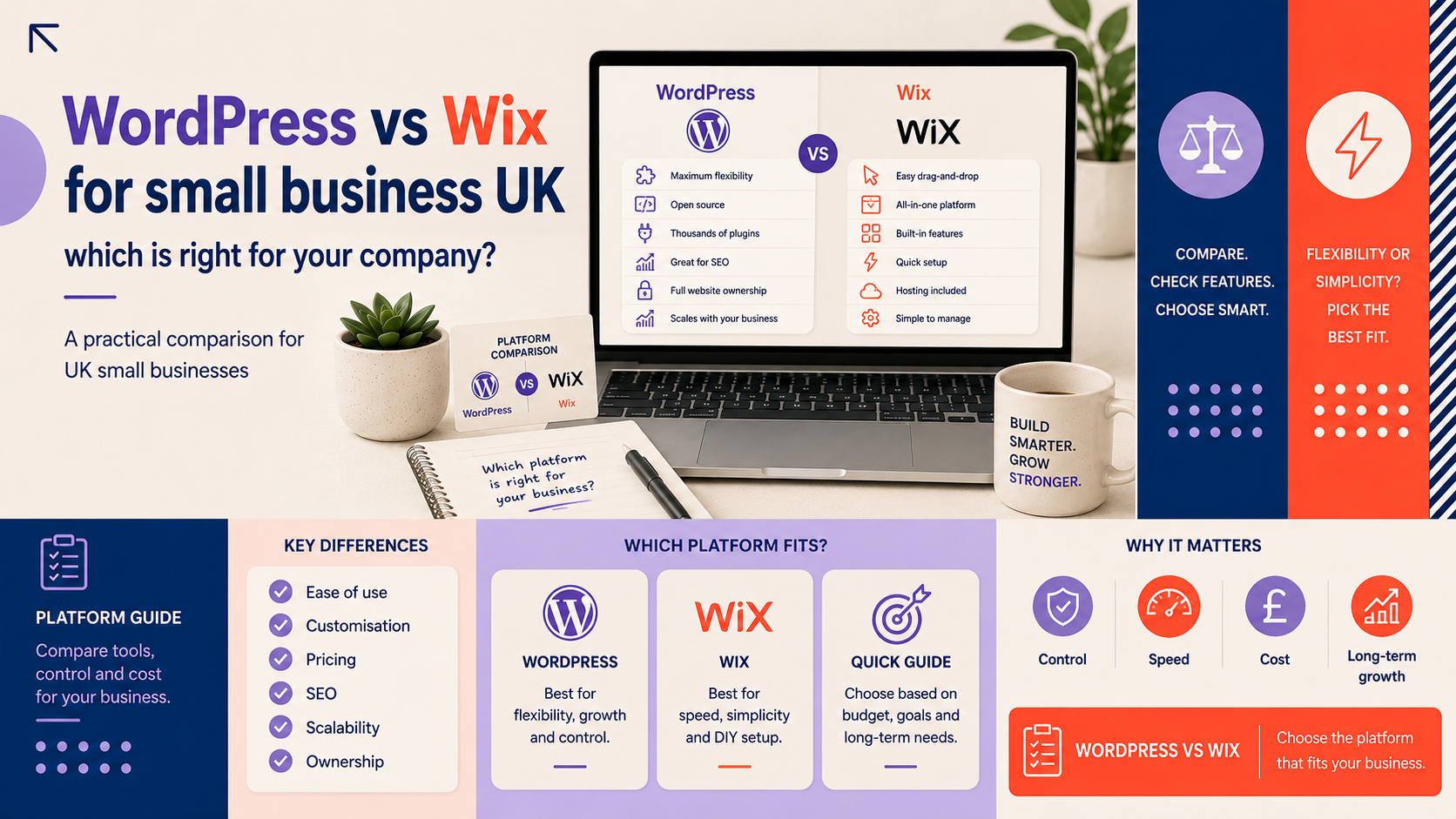
This guide compares WordPress vs Wix for small business UK owners so you can pick the platform that fits your budget, technical ability and growth plans. It covers cost, design flexibility, ecommerce, SEO, maintenance and ownership. Read the short verdict, then use the decision checklist at the end to choose the right option for your company.
Introduction — who this guide is for and how to use it
Who this comparison is aimed at: startups, local shops, tradespeople, consultants and small service providers in the UK who need a website that works now and can grow later.
What we’ll compare: ownership and portability, cost structure, customisation and brand control, ecommerce capability, SEO and local search, ongoing maintenance and legal responsibilities relevant to UK business owners.
How to use the final decision checklist: answer a few short questions about budget, technical skill and growth plans, then follow the recommended platform and next steps. If you need help implementing the choice, the checklist points to sensible trial or agency options.
Quick verdict: which platform suits which type of small business?
Best for simple brochure sites and absolute beginners
Wix is a good choice if you want a quick, hosted solution with an easy visual editor, limited setup fuss and predictable monthly billing. It suits sole traders, cafe owners, small local services and anyone who needs a tidy brochure site and prefers not to manage hosting or technical updates.
Best for growth, custom features or complex ecommerce
WordPress is the better option if you plan to scale, need custom functionality, want full control over hosting and data, or intend to operate a more complex online store. It gives more flexibility for integrations, performance optimisation and advanced SEO.
When to consider a hybrid approach or agency help
If you want a quick start but expect growth, consider starting on Wix with a migration plan, or commission an agency-built WordPress site to avoid rebuilding later. Agencies can also build bespoke themes on WordPress while leaving content management straightforward for staff.
Key differences at a glance
Ownership and portability
- Wix: Hosted platform — you do not get raw site files or database access in the same way as with self-hosted solutions. Exporting content is possible but full portability is limited.
- WordPress: Self-hosted WordPress.org sites are fully portable. You control hosting, files and data and can migrate between providers or servers.
Cost model (platform vs hosting vs development)
- Wix: Predictable subscription plans and optional paid apps. Lower entry cost but advanced features can increase monthly fees.
- WordPress: Variable cost: hosting, premium themes or plugins, and any developer time. Upfront or annual hosting and development costs can be higher but offer greater long-term value.
Customisation and design flexibility
- Wix: Drag-and-drop templates and built-in apps make simple designs quick to deliver, but deep customisation and advanced interactions are limited.
- WordPress: Near-unlimited customisation via themes, page builders and bespoke development. Better for unique branding and complex features.
Maintenance and updates
- Wix: Platform updates are managed for you; minimal technical maintenance required.
- WordPress: You are responsible for updating core, plugins and themes, and for backups and security unless you use managed hosting or an agency retainer.
Cost and value for UK small businesses
Think beyond the headline price. For both platforms consider subscription or hosting, domain name, email, themes or templates, apps or plugins, payment processing fees and any developer time.
What you pay for with Wix (subscriptions, apps, transaction fees)
- Monthly plan for site hosting and editor access.
- Paid add-ons from the app marketplace for forms, bookings, memberships or advanced ecommerce features.
- Payment processor fees from your chosen gateway (e.g. Stripe or PayPal) for online sales.
What you pay for with WordPress (hosting, themes, plugins, developer time)
- Hosting (shared, VPS or managed WordPress) and domain annual costs.
- Premium themes or page builders and paid plugins for forms, SEO, backups and security.
- Developer time for customisation, integrations and initial setup unless you use a low-cost template and do it yourself.
Example: three cost scenarios
- DIY brochure site: Low monthly cost on Wix or a budget WordPress host with a free theme.
- Growing ecommerce: Higher costs for payment gateway fees, shipping integrations and inventory management — WordPress with WooCommerce or Wix with ecommerce plan are common options.
- Agency-built site: Higher upfront cost for a tailored WordPress site with ongoing support; often better value if you need lead generation or bespoke features.
For a detailed WordPress budget guide see our article on How Much Does a WordPress Website Cost for a Small Business in the UK?
Ease of use and ongoing maintenance
Editing content and adding pages
Wix offers an intuitive visual editor that most owners can use without training. WordPress has a learning curve but modern page builders and the block editor make content updates manageable.
Backups, updates and technical maintenance
Wix handles platform maintenance. With WordPress you must schedule or purchase backups, perform plugin and core updates, and monitor security unless you use a managed service or agency support.
Who typically maintains the site (owner, employee, agency)
Smaller UK businesses often maintain simple Wix sites in-house. Businesses choosing WordPress commonly split responsibilities: content updates in-house and technical maintenance via a managed host or an agency. If you choose WordPress, our WordPress website design checklist for UK small businesses is useful when planning who will manage the site.
Design, customisation and brand control
Templates, page builders and bespoke design
Wix templates are ready-made and easy to adapt. WordPress supports page builders and custom themes for unique designs. If your brand needs distinctive layout or features, WordPress offers more scope.
Branding controls: fonts, colours, layouts and responsive design
Both platforms support responsive design, but WordPress gives finer control over typography and layout across devices. If mobile UX matters, invest time in responsive testing or professional design; see our guide to responsive web design for small business for practical tips.
When to hire a designer (and what to ask for)
Hire a designer if you need a bespoke look, stronger brand identity, or custom templates. Ask for responsive mockups, a style guide (fonts, colours, imagery), and delivered assets. If you also need a new logo, consider our Custom logo design service to keep branding consistent.
Ecommerce: selling online in the UK
Wix ecommerce capabilities and limits
Wix supports straightforward online stores, product variants, basic shipping rules and standard payment gateways. For larger catalogues, complex stock management or advanced integrations, Wix can become limiting.
WordPress ecommerce with WooCommerce and alternatives
WordPress with WooCommerce is the most flexible option for UK sellers and supports many payment gateways, shipping plugins and VAT handling. It scales from small shops to large catalogues with the right hosting and extensions.
When to choose Wix vs WordPress for an online store
Choose Wix for small catalogues and simple checkout needs. Choose WordPress if you require advanced inventory management, bespoke checkout flows, or multiple third-party integrations. If you prefer a hosted ecommerce specialist instead, consider our Shopify web design service as an alternative.
For professional ecommerce builds, we offer an e-commerce web design service to handle payments, shipping and UX for UK retailers.
SEO, performance and local search for UK businesses
Technical SEO and speed considerations
WordPress gives more control over technical SEO, structured data and server-level caching. Wix provides built-in SEO settings that are sufficient for many small sites, but advanced optimisation is easier on WordPress using plugins and hosting controls.
Local SEO tips for UK towns and cities
Keep NAP details consistent, create local content and set up or claim your Google Business Profile. Ensure mobile-friendly pages and fast load times; our responsive web design guide explains practical steps for local businesses to improve mobile UX and visibility.
Practical SEO checklist for either platform
- Set clear page titles and meta descriptions.
- Use descriptive headings and a logical URL structure.
- Optimise images and enable caching or CDN for speed.
- Implement structured data for local business and products if applicable.
Security, backups and legal responsibilities (UK-specific)
Who is responsible for security on each platform?
Wix manages platform security. With WordPress the site owner is responsible for keeping core, themes and plugins updated and for choosing secure hosting. Many businesses mitigate risk with managed WordPress hosting or an agency retainer.
GDPR and data handling basics for site owners
Both platforms can be configured to meet GDPR responsibilities, but compliance depends on how you collect and store personal data. For legal and tax matters, seek professional advice tailored to your organisation.
Backups, recovery and incident planning
Ensure regular backups and a tested recovery plan. With WordPress, schedule automated backups or use a managed host. With Wix, confirm the platform’s backup and restore options and retention policy.
Decision checklist — choose WordPress or Wix for your business
Answer these questions to make a decision:
- Budget: Do you prefer predictable monthly fees (Wix) or variable hosting and development costs (WordPress)?
- Technical skill: Will you manage updates and backups, or prefer a hosted solution?
- Growth plans: Do you expect to add complex features or scale the store significantly?
- Ecommerce needs: Are product variants, advanced shipping and multiple integrations required?
- Branding: Do you need a bespoke design and tighter brand control?
Recommended platform based on answers: if you answered mostly towards low budget, low maintenance and simple features, Wix is sensible. If you need flexibility, scalability and ownership, choose WordPress — and if you want professional support, request a WordPress website consultation.
Next steps and low-cost trial options: try Wix’s free plan to test the editor, or set up a low-cost WordPress host and experiment with a theme. If you prefer to skip setup, contact an agency for a tailored quote.
If you need help: practical next steps and where Logo Metic fits in
When to hire an agency vs do-it-yourself
Hire an agency if you need bespoke features, professional ecommerce setup, SEO support or ongoing maintenance. Consider DIY if requirements are modest and you have time to learn the platform.
What to ask a web agency (deliverables, timescales, ownership)
- Ask for a clear scope, deliverables list, ownership of assets and CMS access.
- Request estimated timescales, maintenance options and training for staff.
- If you are B2B-focused, see our B2B web design service page for examples of lead-generation features and sector-specific considerations.
How to request a free consultation
Request a free consultation with Logo Metic to discuss which platform fits your needs and to get a no-obligation plan and quote for design or migration.
FAQ
Is WordPress better than Wix for SEO in the UK?
WordPress offers more advanced SEO controls and server-level optimisations, which can benefit larger or more competitive sites. Wix provides sufficient built-in SEO for many local businesses. The best choice depends on your ambitions and willingness to manage or invest in optimisation.
How much technical maintenance does a WordPress site need compared with Wix?
WordPress requires regular updates to core, themes and plugins plus backups and security monitoring unless you use managed hosting or an agency. Wix handles platform maintenance for you.
Can I move my site from Wix to WordPress later if I start with Wix?
Migration is possible but not always straightforward. Content can usually be exported and re-created on WordPress, but design and functionality often require rebuilding. Plan for migration costs if you expect to move later.
Which platform is better for a small online shop that needs UK payment gateways and VAT handling?
For simple shops, Wix may suffice. For complex VAT calculations, multi-shipping rules or advanced payment integrations, WordPress with WooCommerce typically offers more options. For hosted ecommerce specialists consider Shopify web design as an alternative.
Do I need an agency to get the most from WordPress or Wix?
No—many small businesses manage sites themselves. An agency helps where you need custom features, performance optimisation, ecommerce complexity or ongoing support.
Request a free consultation with Logo Metic to discuss which platform is best for your UK business and to get a tailored plan. Contact support@logometic.co.uk or call +44 7883 180004.