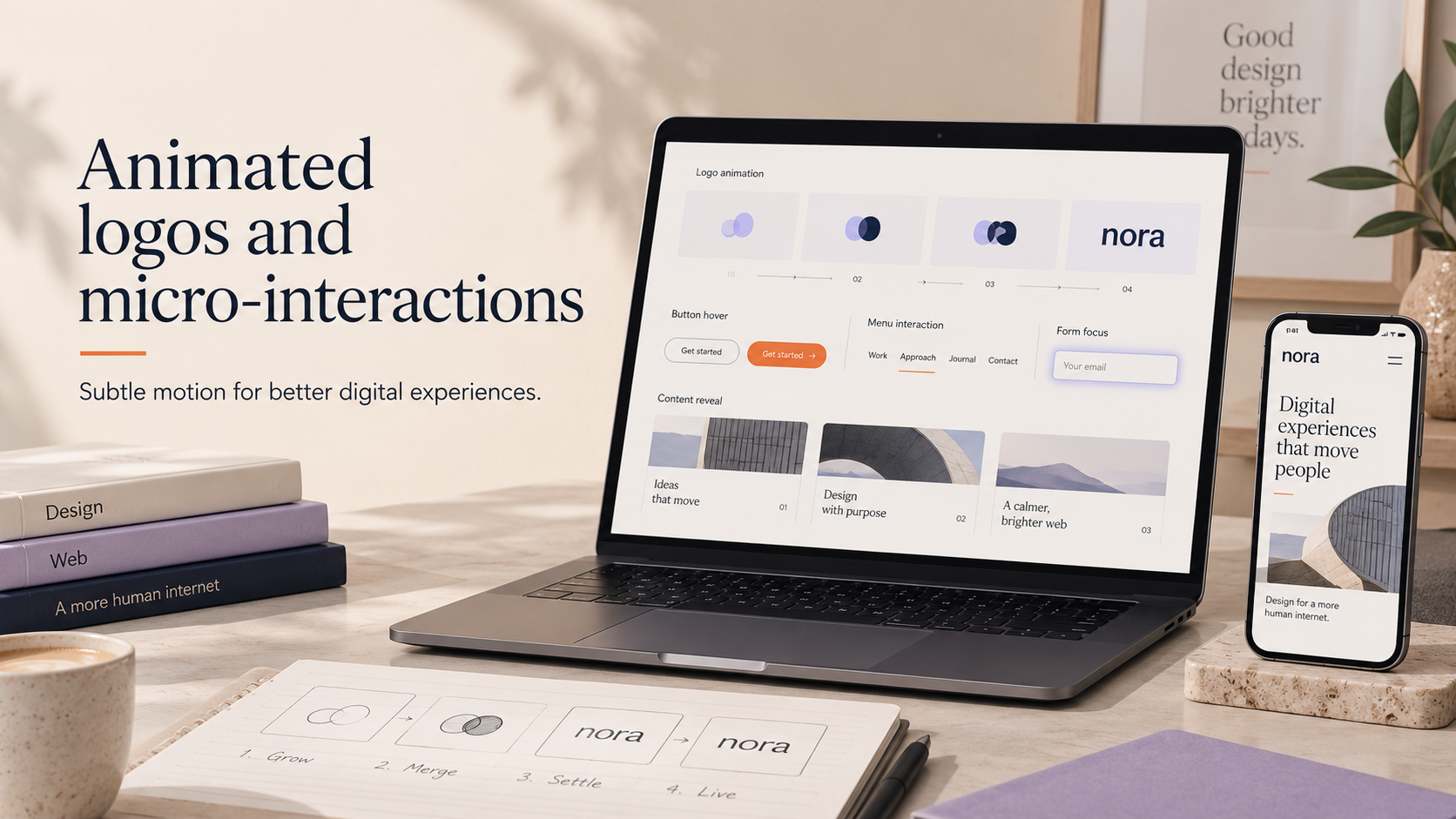
Small, considered motion can make a website or social post feel more polished and guide users without slowing pages. This practical guide to animated logo microinteractions uk explains what they are, where to use them, and how to implement motion that improves engagement while staying performance- and accessibility-first.
Why animated logos and micro-interactions matter for UK small businesses
How motion guides attention and clarifies interaction
Micro-interactions are short, functional animations that communicate state or feedback: a button that subtly pulses to show it’s clickable, or a logo that breathes during a loading state. They attract attention, reduce user uncertainty and make small tasks feel satisfying. For small businesses and ecommerce sites, that improved clarity can increase clicks and reduce friction at key moments.
When to use micro-interactions versus full animations
Choose micro-interactions when the goal is to inform or reinforce UI behaviour. Reserve full-screen or lengthy animations for brand films, video intros or social adverts where richer storytelling is required. Micro-interactions are ideal for repeated UI touchpoints; full animations work better as occasional brand moments.
Common touchpoints: website headers, CTAs, loading states and social intros
Good places to add motion include:
- Header or logo area on the homepage (subtle entry or idle loop)
- Call-to-action hover and click states
- Loading states for product lists, search and checkout
- Short social intro animations for video or stories
For more on social and video use-cases, see our article on the benefits of animated logo.
Performance-first principles: keeping motion lightweight
Choose the right format: SVG, Lottie (JSON), APNG, GIF or MP4 — quick comparison
- SVG: Best for vector logo motion and crisp scaling. Small file sizes for simple animations and widely supported. Use when you can animate shapes and strokes.
- Lottie (JSON): Exports from After Effects via Bodymovin. Vector-based, small and interactive. Good for complex vector motion with runtime control, but check browser support and fallbacks.
- APNG: Better colour than GIF but larger files; useful for short raster loops where transparency is needed.
- GIF: Universal support but often large and colour-limited; avoid for high-quality logos.
- MP4/WebM: Best for complex raster motion or social video. Use short clips and ensure autoplay behaviour is acceptable.
File-size targets and why small files matter for Core Web Vitals
Large media assets can harm load times and Core Web Vitals such as Largest Contentful Paint (LCP). Aim for single animated assets under 100–200KB for in-header elements where possible. For short social videos, keep clips under 5MB if you expect frequent mobile viewing. Smaller files reduce load time, bandwidth costs and the risk of users abandoning the page.
Optimisation techniques: minification, compression, lazy-loading and caching
Keep motion lightweight by:
- Exporting SVGs cleanly (remove editor metadata) and minifying
- Using Lottie and removing unnecessary effects to reduce JSON size
- Converting video to WebM where supported and serving MP4 fallback
- Lazy-loading off-screen animations and deferring non-essential scripts
- Leveraging long cache lifetimes for static assets and a CDN for delivery
If your site runs on WordPress, review caching and lazy-load options provided by your theme or plugins; our WordPress web design service can help integrate these patterns.
Technical specs and examples for web and socials
Animated logo specs for websites (recommended formats and sample sizes)
- SVG animation: single-file SVG or inline SVG with CSS/SMIL; aim for <100KB where possible.
- Lottie: compressed JSON; aim for 20–200KB depending on complexity. Provide a static SVG/PNG fallback.
- Video intro (MP4/WebM): 720p max for header clips; keep duration under 6 seconds and file size below 1–3MB when used on pages.
Animated logo specs for social media (profile animation, story/short intro specs)
Platform rules change regularly, so keep files short and mobile-friendly. General guidance:
- Profile animations: Many platforms don’t support animated profile images; use short video posts or bio intro instead.
- Stories/shorts: 9:16 vertical format, 3–6 seconds for intros; MP4 preferred. See our short-intro guide for ecommerce-specific specs and templates: short intro animations for product videos.
- Feed posts: 1:1 or 4:5 crops, under 15 seconds; include a clear thumbnail frame for accessibility and preview.
Short examples: 3–6 second intro, hover micro-interaction, loading micro-animation
Examples to start with:
- 3–6s intro: Simple build-up: brand mark elements assemble then settle. Export as MP4/WebM and also provide a 1-frame PNG for thumbnails.
- Hover micro-interaction: Logo element brightens or shifts 3–6px on hover. Implement with CSS transforms and SVG for pixel-perfect rendering.
- Loading micro-animation: Minimal loop (e.g. pulsing dot or stroke reveal). Use CSS or Lottie; ensure it stops once content loads.
Retailers should treat checkout and product pages conservatively: subtle, performance-friendly motion only. If you run an online store, our e-commerce store design team can advise on optimal placement and formats.
Design rules for effective micro-interactions
Timing, easing and duration: micro-interaction best-practices
- Keep durations short: 150–500ms for feedback, 300–800ms for entry/exit animations.
- Use easing that feels natural (ease-out or custom cubic-bezier) to avoid mechanical motion.
- Avoid long loops or recurring motion that distracts users; prefer short, meaningful movement.
Triggering: hover, click, scroll and on-load—guidelines and UX considerations
Design triggers thoughtfully:
- Hover: useful on desktop; provide equivalent focus styles for keyboard users.
- Click: use motion to confirm action (for example, a subtle success tick).
- Scroll and on-load: ensure animations don’t block content or cause layout shift.
Brand consistency: keeping motion aligned with identity and tone
Motion should feel like part of the brand voice. If your brand is calm and professional, choose gentle easing and minimal movement. For more energetic brands, timed bursts or lively easings can work—ensure they match colour, typography and pacing from your wider guidelines. If you need help aligning motion with identity, see our brand identity design service.
Accessibility and inclusive motion
Respecting reduced-motion settings and alternatives
Support the user’s operating system reduced-motion preference. Provide a non-animated fallback or a static logo. For web, use the prefers-reduced-motion media query to pause or simplify animations.
Contrast, pause controls and avoiding seizure-triggering patterns
Avoid flashing or rapid patterns and maintain adequate contrast for legibility. For longer or attention-grabbing animations, offer a visible pause or skip control. Test animations against accessibility checklists and pause options.
Testing with assistive technologies
Confirm that animations do not interfere with screen readers or keyboard navigation. Provide ARIA attributes where motion communicates state (for example, aria-busy on loading). For social motion, include descriptive captions and alt text; our guide to accessible social media graphics offers practical checks for social assets.
Implementation checklist for small UK businesses
Pre-launch checklist for designers (assets, formats, accessibility)
- Export vector and raster assets: SVG, Lottie JSON, MP4/WebM and PNG fallbacks.
- Provide a static fallback frame and alt text.
- Document timing, easing and trigger behaviour in a handoff brief.
Developer checklist (lazy-load, caching, fallbacks)
- Lazy-load off-screen animations and defer animation scripts.
- Set long cache headers and use a CDN for distribution.
- Implement prefers-reduced-motion and ensure logical fallbacks for unsupported browsers.
Social publishing checklist (export settings, captions, thumbnail frames)
- Export short MP4/WebM clips with correct aspect ratios and a clear thumbnail frame.
- Include captions and descriptive text for accessibility.
- Plan publishing cadence—animated intros are best used sparingly to keep novelty.
Tools, handoff and recommended workflows
Design tools and export options
Common workflows include After Effects → Bodymovin for Lottie, or designing in Figma/Illustrator and exporting animated SVGs. Keep a handoff checklist of exported files, knobs for runtime control and recommended compression settings.
Version control and asset naming for easy CMS/WordPress integration
Name assets clearly (e.g. brandmark-loading.v1.lottie.json) and store them in a versioned asset folder. For WordPress sites, uploading final assets to the media library and referencing them from theme templates or a lightweight plugin ensures predictable delivery.
Working with an agency or freelancer: what to brief and what deliverables to expect
A brief should include: target touchpoints, brand guidelines, preferred formats, performance budgets and accessibility requirements. If you are commissioning ongoing social animation work, our article on social media content design pricing models explains common procurement options.
Measuring success and iterating
KPIs to track: engagement, CTR, bounce rate and performance metrics
Track how motion affects user behaviour (click-through rate on CTAs, interaction rate for animated elements) and monitor performance metrics such as LCP and total blocking time. Ensure motion doesn’t increase bounce or harm accessibility metrics.
A/B testing simple motion variants
Run small A/B tests to compare static vs animated logos, or different motion timings. Keep variants minimal so you can attribute changes confidently.
When motion isn’t working: signs and quick remedies
If an animation increases load time, causes layout shift, or users report distraction, simplify the motion, reduce file sizes or switch to a static fallback.
FAQ
Will an animated logo slow down my website and harm SEO?
Not if implemented with performance-first principles. Use small formats (SVG or compressed Lottie), lazy-load non-critical animations and monitor Core Web Vitals. Poorly optimised large video or GIF files can harm load times and SEO.
Which file format is best for animated logos on websites and social media?
For websites, SVG or Lottie is usually best for vector motion. For social, MP4/WebM is most reliable. Choose the format that balances fidelity, interactivity and file size.
How do I make animated logos accessible for users with motion sensitivity?
Respect the prefers-reduced-motion setting, provide static fallbacks, avoid flashing patterns and offer pause controls for persistent loops.
How long should an intro animation or micro-interaction last?
Keep micro-interactions under 500ms for feedback and under 800ms for entry animations. Intro clips for social or product videos commonly sit between 3–6 seconds.
Can animated logos be implemented on WordPress without custom development?
Yes. Simple SVG or Lottie embeds can be added via the media library, lightweight plugins or theme blocks. For more complex behaviour, a small theme or plugin adjustment may be required; our WordPress web design service can help with integration.
Conclusion and next steps
Small, purposeful motion can enhance clarity and engagement when it’s designed and implemented with performance and accessibility in mind. Quick checklist: choose vector-first formats, keep files small, respect reduced-motion and provide fallbacks.
If you need help creating or implementing animated logos and micro-interactions, request a free consultation with Logo Metic. For businesses starting from scratch consider our custom logo design service; if you need motion aligned to a wider identity, see our brand identity design.
Contact us to discuss formats, performance budgets and a rollout plan for your website or social channels.